
DuoView 18.5 UltraWide Review: The Biggest Single-Screen Laptop Extender for Indian Professionals
There is a particular kind of frustration that comes with working on a single laptop screen all day. You have
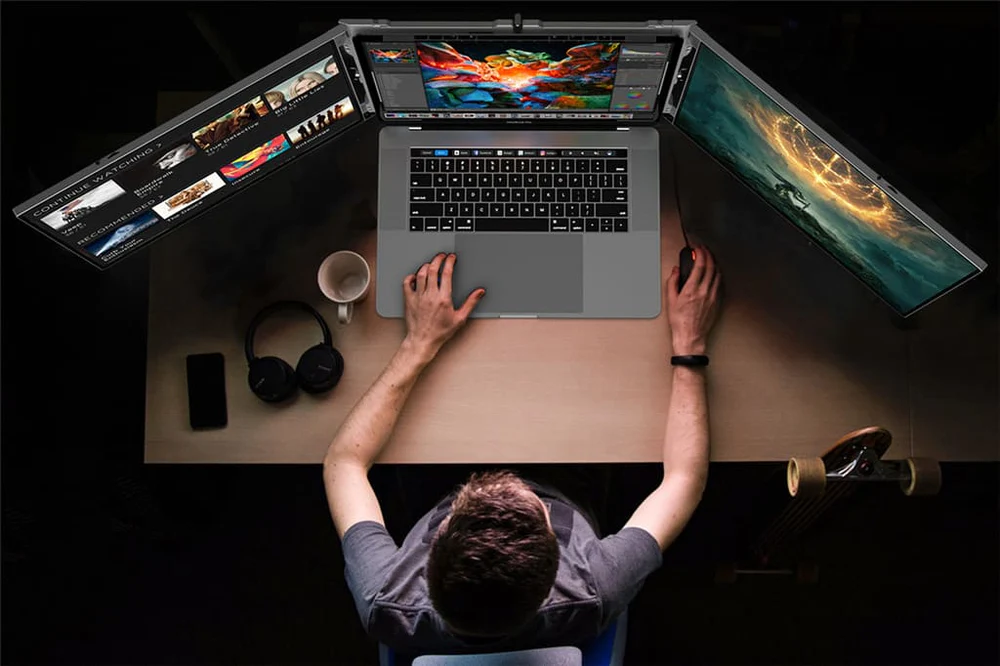
Two screens changed the way professionals work. Three screens change the game entirely.
When your laptop screen holds your primary work, a second screen holds your reference, and a third screen holds your communications, everything stays visible, nothing gets buried, and the constant tab-switching that silently drains productivity all day long simply stops. While a basic dual monitor or dual monitor setup is a good start, it often leaves power users wanting more.
The challenge for most Indian professionals has always been cost and practicality. A triple-monitor desktop setup requires a dedicated desk, multiple stands, and enough cables to make any workspace look like a server room. It does not travel. It does not set up in a co-working space in two minutes.
The Xavion TriView 14 DualLink was built to solve exactly this. Functioning as a premium tri screen monitor for laptop multitasking, it offers three screens: your laptop plus two additional 14-inch Full HD IPS panels in a foldable monitor package that weighs 1.68 kg and connects through USB-C, USB-A, or HDMI.
At ₹22,999, it is the most affordable trifold laptop monitor in the Xavion TriView lineup. Here is everything you need to know about it.
The TriView 14 DualLink is a portable monitor and dual-panel laptop screen extender that attaches to your existing laptop and instantly creates a three-screen workstation. Moving far beyond a standard dual screen laptop or basic dual monitor for laptop, the two additional 14-inch panels fold out from either side of your laptop, giving you a symmetrical multi screen display setup that sits cleanly on any desk surface.
It is foldable for travel, lightweight enough to carry in a standard work bag, and compatible with both Windows and macOS. The name DualLink refers to its two additional screen panels, each one linking independently to your laptop, expanding your available display real estate by roughly three times compared to a single laptop monitor screen.
If you are looking for a highly capable extended monitor for laptop use, here is how the specs break down:
| Specification | Detail |
| Screen Size | 14.0 inches × 2 panels |
| Resolution | 1920 × 1080 Full HD (per panel) |
| Display Technology | IPS (LED) |
| Aspect Ratio | 16:9 |
| Refresh Rate | 60 Hz |
| Response Time | 25 ms |
| Brightness | 250 nits (cd/m²) |
| Contrast Ratio | 800:1 |
| Viewing Angle | 170° horizontal / 170° vertical |
| Colour Gamut | 45% NTSC |
| Eye Care | Low Blue Light Mode |
| Connectivity | USB-C, USB-A, HDMI |
| Plug and Play | Partial (USB-C plug and play; driver required for USB-A and HDMI) |
| Driver Required | Yes (for USB-A and HDMI only) |
| Weight | 1.68 kg |
| Thickness | 4 mm per panel |
| Height | 210 mm |
| OS Compatibility | Windows and macOS |
| Compatible Devices | Laptop, Desktop, PC |
| Power | Required when using HDMI or USB-A |
| Mount Type | Desk mount |
| Use Cases | Triple-screen multitasking, remote work, trading, productivity |
| Warranty | 12 months |
14-Inch Full HD IPS on Both Panels Each of the two additional screens runs at 1920×1080 Full HD resolution on an IPS panel. At 14 inches, the pixel density is high enough that text remains sharp and readable without any scaling. As an external display, individual interface elements stay crisp rather than appearing soft or blurry.
IPS technology ensures colour accuracy and consistency across the entire panel surface. Whether you are comparing it to standalone aura displays or searching for a high-quality aura display screen for laptop usage, the IPS panels in the TriView 14 DualLink maintain accurate visuals at 170 degrees in both the horizontal and vertical directions.
800:1 Contrast Ratio An 800:1 contrast ratio means the darkest blacks and brightest whites the display can produce are separated by a factor of 800. For trading dashboards, dark-mode development environments, and data-heavy business applications, this level of contrast keeps information on your additional screen for laptop setups legible and easy to process quickly.
250 Nits Brightness with Low Blue Light Mode At 250 nits, the TriView 14 DualLink is calibrated for indoor professional use. Low Blue Light Mode is built directly into the display hardware. For professionals spending hours a day in front of multiple screens, the ability to reduce blue light output at the monitor level is a genuinely useful feature.
USB-C: Plug and Play, No Driver Needed Via USB-C, the TriView 14 DualLink works as a true plug-and-play laptop extension monitor screen. Connect the cable, and the two additional panels come on without any driver installation or system restart.
USB-A: Maximum Compatibility, Driver Required For laptops and desktops without USB-C ports, the USB-A connection provides full compatibility. A driver download is required when connecting via USB-A.
HDMI: Desktop and PC Flexibility HDMI connectivity extends the TriView 14 DualLink’s compatibility to desktop PCs and workstations. This option makes the product genuinely useful not just as a monitor for laptop extension but as a multi screen for laptop and desktop setups that need triple-screen capability.
Remote Workers and Work-From-Anywhere Professionals The defining characteristic of the TriView 14 DualLink is that it travels. For anyone who needs a portable monitor for laptop multitasking, it deploys on any flat surface in under two minutes. Real customer reviews echo this directly. A trader who moves between co-working spaces described the difference a portable extended display screen for laptop made to his ability to work effectively.
Stock, Commodity, and Forex Traders Active traders are the primary professional audience for this setup. Building the right trading monitor setup at home requires more live data than a single screen can display. With the TriView 14 DualLink, you get a dedicated trading setup monitor environment. A trader can dedicate each of the three screens to a distinct function. If you need a comprehensive multi monitor trading setup or specific multi screen monitors for trading, this layout rivals even a dedicated 4 monitor setup for trading while remaining portable.
Software Developers and Engineers The three screens of the TriView 14 DualLink allow a developer to lay out their entire environment without stacking or hiding anything. For users seeking an extra screen for laptop coding, the laptop extended screen holds the terminal and documentation perfectly.
Business Analysts and Finance Professionals The TriView 14 DualLink gives these users the ability to keep their model open on one screen, their reference data on another, and their output document on the third. For teams who monitor dashboards, a multiple screen setup for laptop usage is a direct productivity multiplier.
The 14-inch panel size is a considered balance between screen real estate and portability. For professionals seeking a robust multiple monitor for laptop solution, it acts as a lightweight alternative to bulkier options like a triple aero 15.6 pro max extended screen. It is large enough to run a full 1920×1080 workspace with comfortable text sizing, making it the perfect monitor screen for laptop and laptop screen extender monitor hybrid.
| Model | Panel Size | Weight | Connectivity | Price |
| TriView 14 DualLink | 14 inch × 2 | 1.68 kg | USB-C, USB-A, HDMI | ₹22,999 |
| TriView 14 Ultra Sleek | 14 inch × 2 | 1.0 kg | USB-C, USB-A | ₹28,949 |
| TriView 15.6 VertiFlex | 15.6 inch × 2 | 1.34 kg | USB-C, HDMI, USB-A | ₹27,999 |
| TriView 18.5 VertiMax | 18.5 inch × 2 | 2.4 kg | USB-C, HDMI | ₹32,999 |
The TriView 14 DualLink is the most affordable model in the TriView range, and the only one offering all three connectivity options, making it the most versatile screen for laptop extension. If you are waiting for a futuristic dual screen laptop 2025 model, grabbing a portable triple-screen system now gives you an immediate productivity boost.
The TriView 14 DualLink is priced at ₹22,999 and comes with a 12-month manufacturer warranty. Xavion provides a 7-day return policy for products returned unused and in original condition. Customer support is available 24/7 by phone at +91-932-878-3234, by email at sales@xavion.in, and via WhatsApp. The driver download is available at xavion.in/driver.
The Xavion TriView 14 DualLink delivers what most professionals need from a multiple monitor for laptop setup: three Full HD IPS screens, clean USB-C plug-and-play connectivity, and a foldable form factor that travels.
At ₹22,999, it is the right starting point for traders, developers, analysts, and remote workers who want to step beyond the limitations of a basic dual screen monitor setup without the bulk and cost of a fixed desktop configuration.
Three screens. One setup. Anywhere you work.
Explore the Xavion TriView 14 DualLink at xavion.in Also available on Amazon India | Fast shipping across India | 12-month warranty | 7-day returns | 24/7 customer support
There is a particular kind of frustration that comes with working on a single laptop screen all day. You have
Two screens changed the way professionals work. Three screens change the game entirely. When your laptop screen holds your primary